
1. The Real Cost of “Forgot Password”
How many times last week did you click “Forgot Password”? For most busy professionals and small business owners in the US and UK, the answer is too many. Relying on weak passwords, reusing the same password across multiple sites, or jotting them down on sticky notes are not just minor inconveniences—they are major security risks.
The shift toward secure, reliable tracking is mandatory because:
- Cybersecurity Risk: One weak link can expose your entire digital life (bank, email, social media) to hackers.
- Time Loss: Constantly resetting passwords disrupts workflow and causes frustration.
- Digital Fatigue: Managing dozens of unique logins without a system is mentally taxing.
2. Digital vs. Paper: Why a Spreadsheet Password Tracker is the Perfect Compromise
While digital password managers (LastPass, 1Password) offer convenience, many users, particularly those concerned with cloud security or preferring an offline backup, seek an alternative.
A well-designed Password Tracker Spreadsheet (Excel or Google Sheets) offers the ideal balance:
| Feature | Benefit |
| Offline Control | You maintain 100% control; the data never leaves your device or cloud folder (if you choose). |
| Custom Categories | Unlike rigid software, you can tailor columns (e.g., “Two-Factor Auth Status,” “Last Changed Date”). |
| Printable Backup | The Printable Password Log option provides a physical, secure backup kept in a locked location. |
| Simplicity | No learning curve, no recurring subscription fees—just a straightforward, organized list. |
Security Tip: If using a spreadsheet, ensure the file itself is protected with a strong master password and is stored in a secured, encrypted folder on your computer, separate from your main documents.
3. Best Practices for Creating and Maintaining Strong Passwords
The tool is only as good as the raw data you put into it. Here is the Digital Downloads Life checklist for true password security:
- Embrace Complexity: Use long, memorable passphrases (e.g., MountainBike2025!), not short, simple words. Aim for 12 characters minimum.
- Uniqueness is King: Never reuse passwords across sites, especially for financial or primary email accounts. If one account is breached, the others remain safe.
- Regular Updates: While less critical if passwords are unique, refresh key passwords (email, bank) every 6-12 months. Your spreadsheet should help you track this “Last Changed Date.”
- Use 2FA/MFA: Wherever possible, enable Two-Factor or Multi-Factor Authentication. Note the status in your Password Organizer spreadsheet.
4. Setting Up Your Spreadsheet for Maximum Organization
Your template should move beyond a simple name/password column. A truly effective spreadsheet includes:
- Website/App Name: (e.g., Amazon, Bank of America)
- Username/Email:
- Password: (This column should be hidden or visually minimized when not in use.)
- Security Question/Hint: (Optional, but helpful)
- Last Updated Date: (Crucial for maintenance)
- 2FA Status: (Yes/No/App Name)
Ready to Take Control of Your Digital Security?
The digital world demands organization, and the first step to peace of mind is taking back control of your credentials. Stop juggling different logins and risking your security with weak, reused passwords.
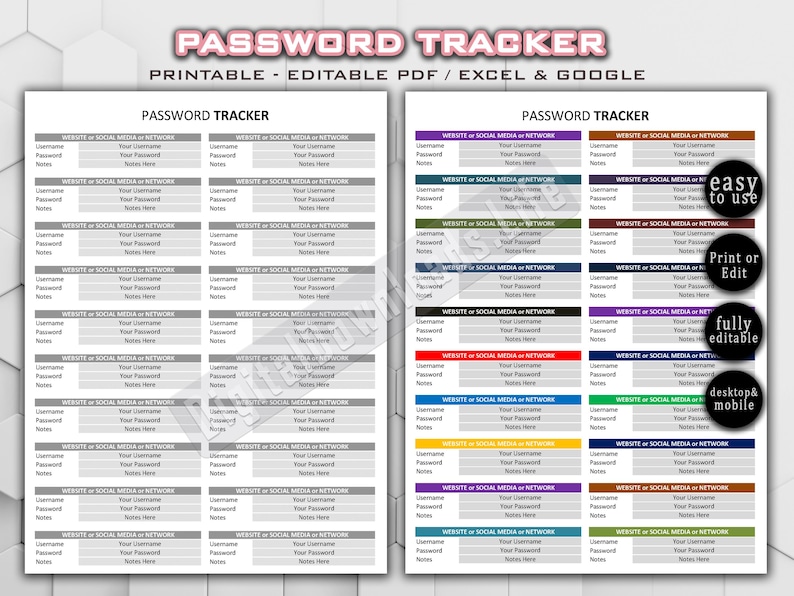
Our Secure Password Tracker Spreadsheet is designed for the modern user who demands simplicity, security, and total control. Available in both Excel/Google Sheets formats for flexibility and a Printable PDF log for offline backups.
Simplify your security today and make “Forgot Password” a distant memory.
[VIEW OUR PASSWORD TRACKER SPREADSHEET ON ETSY]
“Which password did I use for this site?” “Was it Capital letter or special character?”
We have all been there. The frustration of clicking “Forgot Password,” waiting for the reset email, and creating a new password—only to forget it again next month.
Stop the cycle of digital chaos. Our Password Tracker Bundle is the safest, simplest way to organize your sensitive login information offline, keeping it away from hackers and cloud breaches.
- How to Design a T-Shirt for Beginners: The A-Z Guide for Using SVG and PNG Files
- 5 Common Financial Mistakes Small Businesses Make (and How to Fix Them with a Spreadsheet)
- Sparkle & Patriotism: The Ultimate 4th of July Sublimation Design Guide

- The Funniest Patriot: ‘Just Here for the Fireworks’ SVG & PNG Guide

- Building Responsibility: The Ultimate Guide to Utilizing a Weekly Chore Chart for Kids

Leave a Reply